
Mobile
Marketing
In-game purchases
From functionality to player care: What Seamless Experience means and why it matters
March 17, 2026•5 min

Seamless Experience is a Web Shop feature that means players don't feel the transition when moving between different parts of your game ecosystem. For web shops, this means your store doesn't feel like an external service – it feels like a natural extension of the game.
The value is clear: when players encounter familiar visuals, interface logic, and interaction patterns, they stay focused on what matters – your content. They move through the purchase flow with confidence instead of friction.
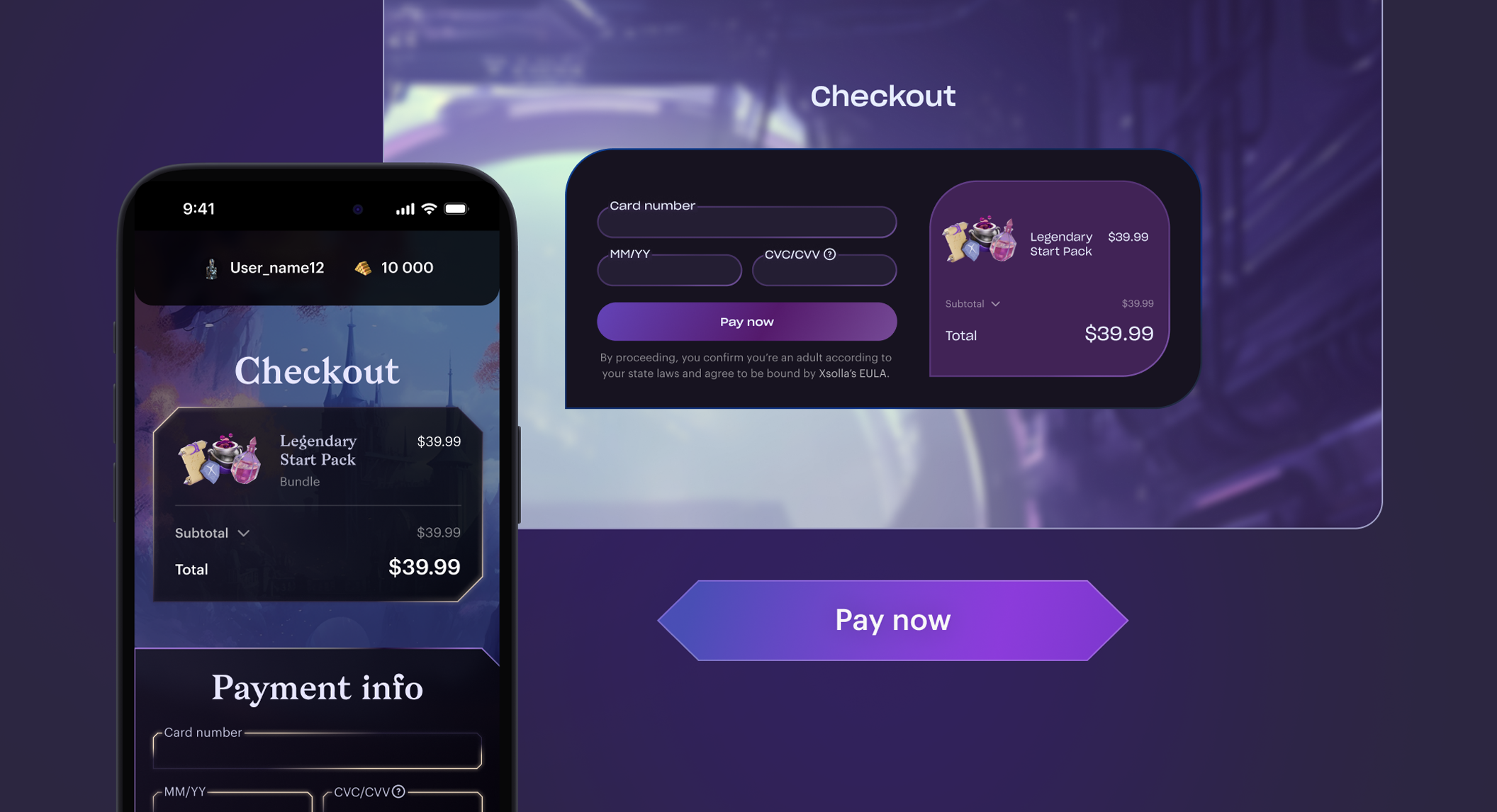
 The goal is to help players complete a web shop purchase. But it should still feel like part of the game, not a detour to a third-party site
 Screenshots that don't match actual gameplay, art assets not found in-game, or a complete absence of visual context—even one mismatch disrupts the impression. The web shop starts feeling like a generic system page rather than part of the game world. That matters even more during seasons and events: if your game updates its UI, characters, or offers, the web shop should reflect those changes, too.
 Background is an active store element. It creates depth, space, and overall mood. Contrast between background and cards helps establish hierarchy, gradients add perspective, and color zones can guide navigation, especially in games with multiple themes.
Cards are the key layer above the background—the first zone of player focus. If your game uses unusual design choices—such as odd borders, volume, special layouts—repeat at least the most characteristic elements. How cards are perceived should match player habits from the game: size, density, number of elements on screen.
Illustrations are often overlooked, though they're what actually sell. In mobile games illustrations might be small, but in web shops – especially desktop versions—show full-format images. Quality assets, thoughtful compositions, and careful work with scale significantly increase trust and purchase decision speed.
Typography isn't just the font – it’s how it behaves in the system. Sizes, hierarchy, relationship to cards and blocks. If your main game font doesn't read well at small sizes, it may need support – like a neutral companion font that doesn't pull focus.
Buttons are the web shop's primary action. By repeating button patterns from your game, you give players a familiar, safe path to purchase. Color, volume, states, text placement—all of this works toward continuity.
Smaller entities, such as labels, icons, navigation, gradients, additional indicators, are often what make an interface feel ‘foreign’. If new elements are created specifically for the store, they should logically continue the existing visual system.
UI Behavior
In-game navigation and web shop navigation aren’t the same, and since around 90% of web shop purchases happen on mobile, it’s worth designing mobile-first. Scrolling, transitions, and the purchase flow should feel short, predictable, and easy to move through, with navigation patterns like a sidebar or bottom nav where it helps.
Plan ahead what will feel intuitive and what might confuse players, breaking their sense of control.
Tone and Contrast
Players launch games at different times of day under different lighting conditions. A bright, high-contrast store can be just as irritating in the evening as an overly dark interface is during the day.
Background is an active store element. It creates depth, space, and overall mood. Contrast between background and cards helps establish hierarchy, gradients add perspective, and color zones can guide navigation, especially in games with multiple themes.
Cards are the key layer above the background—the first zone of player focus. If your game uses unusual design choices—such as odd borders, volume, special layouts—repeat at least the most characteristic elements. How cards are perceived should match player habits from the game: size, density, number of elements on screen.
Illustrations are often overlooked, though they're what actually sell. In mobile games illustrations might be small, but in web shops – especially desktop versions—show full-format images. Quality assets, thoughtful compositions, and careful work with scale significantly increase trust and purchase decision speed.
Typography isn't just the font – it’s how it behaves in the system. Sizes, hierarchy, relationship to cards and blocks. If your main game font doesn't read well at small sizes, it may need support – like a neutral companion font that doesn't pull focus.
Buttons are the web shop's primary action. By repeating button patterns from your game, you give players a familiar, safe path to purchase. Color, volume, states, text placement—all of this works toward continuity.
Smaller entities, such as labels, icons, navigation, gradients, additional indicators, are often what make an interface feel ‘foreign’. If new elements are created specifically for the store, they should logically continue the existing visual system.
UI Behavior
In-game navigation and web shop navigation aren’t the same, and since around 90% of web shop purchases happen on mobile, it’s worth designing mobile-first. Scrolling, transitions, and the purchase flow should feel short, predictable, and easy to move through, with navigation patterns like a sidebar or bottom nav where it helps.
Plan ahead what will feel intuitive and what might confuse players, breaking their sense of control.
Tone and Contrast
Players launch games at different times of day under different lighting conditions. A bright, high-contrast store can be just as irritating in the evening as an overly dark interface is during the day.
 Tone and contrast matter not just in the game-to-store connection, but within the web shop itself. Tone sets the mood, while contrast work helps you manage attention and emotional intensity. In casual games, players are usually in a relaxed mindset and expect bright, simple solutions. In horror games, the opposite: they pick up on nuances, so dark tones and muted contrast are important.
Animations
If your project gets to the point of implementing animations, that's a good sign. Repeating game animations or creating simplified versions isn't just about functionality anymore – it's about care. Quality animations strengthen the feeling of thoughtfulness and communicate your product's overall level.
Seamless Experience isn’t one big redesign – it’s a bunch of small consistency decisions that add up. Start with the basics (context, visuals, navigation, and checkout flow), then keep the web shop in sync as your game updates with new seasons, characters, and offers.
If you want to make that easier to maintain, Xsolla Web Shop gives you the tools to keep your store consistent with your game – from templates and customization to mobile-first UX built for repeat buying.
Tone and contrast matter not just in the game-to-store connection, but within the web shop itself. Tone sets the mood, while contrast work helps you manage attention and emotional intensity. In casual games, players are usually in a relaxed mindset and expect bright, simple solutions. In horror games, the opposite: they pick up on nuances, so dark tones and muted contrast are important.
Animations
If your project gets to the point of implementing animations, that's a good sign. Repeating game animations or creating simplified versions isn't just about functionality anymore – it's about care. Quality animations strengthen the feeling of thoughtfulness and communicate your product's overall level.
Seamless Experience isn’t one big redesign – it’s a bunch of small consistency decisions that add up. Start with the basics (context, visuals, navigation, and checkout flow), then keep the web shop in sync as your game updates with new seasons, characters, and offers.
If you want to make that easier to maintain, Xsolla Web Shop gives you the tools to keep your store consistent with your game – from templates and customization to mobile-first UX built for repeat buying.
The goal is to help players complete a web shop purchase. But it should still feel like part of the game, not a detour to a third-party site
What’s at stake
Your web shop is part of the game experience. Every purchase is a moment of risk: players hesitate, question whether it’s worth it, and decide fast. A positive purchase experience doesn't just increase revenue – it affects who sticks around, who gets used to the experience, and continues playing and buying. The experience players have in your web shop directly influences how they perceive your game's relationship with them. A well-designed store impacts retention, purchase frequency, and return rates. It also builds trust. A quality-designed web shop creates a sense of reliability and confidence that players are interacting with an official experience, not a third-party service.Components of Seamless Experience
The better you execute Seamless Experience, the less players notice it. That's the paradox: in an ideal scenario, players shouldn't be thinking, 'this is well-designed.' The challenge is keeping multiple layers aligned at once. When moving players from game to web shop, you need to maintain continuity across context, visuals, UI behavior, tone, contrast, and animation. Each component might seem minor on its own, but together they create the feeling of a cohesive experience. Understanding a few basic design principles lets you improve the player journey even in visually simple games. Context Players rarely think about interfaces consciously, but they still notice inconsistencies. If your game features characters prominently, but the store doesn't show them on the first screen, the illusion breaks.
Screenshots that don't match actual gameplay, art assets not found in-game, or a complete absence of visual context—even one mismatch disrupts the impression. The web shop starts feeling like a generic system page rather than part of the game world. That matters even more during seasons and events: if your game updates its UI, characters, or offers, the web shop should reflect those changes, too.
The role of visuals in Seamless Experience
Visuals are the biggest and most complex part of Seamless Experience. From image quality to button border colors, every detail either supports continuity or breaks it. The more visual decisions you can carefully transfer from game to web shop, the more cohesive the player experience becomes. To simplify working with this element, think of visuals as a system of layers: background, cards, images, typography, buttons, and smaller UI elements.
Background is an active store element. It creates depth, space, and overall mood. Contrast between background and cards helps establish hierarchy, gradients add perspective, and color zones can guide navigation, especially in games with multiple themes.
Cards are the key layer above the background—the first zone of player focus. If your game uses unusual design choices—such as odd borders, volume, special layouts—repeat at least the most characteristic elements. How cards are perceived should match player habits from the game: size, density, number of elements on screen.
Illustrations are often overlooked, though they're what actually sell. In mobile games illustrations might be small, but in web shops – especially desktop versions—show full-format images. Quality assets, thoughtful compositions, and careful work with scale significantly increase trust and purchase decision speed.
Typography isn't just the font – it’s how it behaves in the system. Sizes, hierarchy, relationship to cards and blocks. If your main game font doesn't read well at small sizes, it may need support – like a neutral companion font that doesn't pull focus.
Buttons are the web shop's primary action. By repeating button patterns from your game, you give players a familiar, safe path to purchase. Color, volume, states, text placement—all of this works toward continuity.
Smaller entities, such as labels, icons, navigation, gradients, additional indicators, are often what make an interface feel ‘foreign’. If new elements are created specifically for the store, they should logically continue the existing visual system.
UI Behavior
In-game navigation and web shop navigation aren’t the same, and since around 90% of web shop purchases happen on mobile, it’s worth designing mobile-first. Scrolling, transitions, and the purchase flow should feel short, predictable, and easy to move through, with navigation patterns like a sidebar or bottom nav where it helps.
Plan ahead what will feel intuitive and what might confuse players, breaking their sense of control.
Tone and Contrast
Players launch games at different times of day under different lighting conditions. A bright, high-contrast store can be just as irritating in the evening as an overly dark interface is during the day.
Tone and contrast matter not just in the game-to-store connection, but within the web shop itself. Tone sets the mood, while contrast work helps you manage attention and emotional intensity. In casual games, players are usually in a relaxed mindset and expect bright, simple solutions. In horror games, the opposite: they pick up on nuances, so dark tones and muted contrast are important.
Animations
If your project gets to the point of implementing animations, that's a good sign. Repeating game animations or creating simplified versions isn't just about functionality anymore – it's about care. Quality animations strengthen the feeling of thoughtfulness and communicate your product's overall level.
Seamless Experience isn’t one big redesign – it’s a bunch of small consistency decisions that add up. Start with the basics (context, visuals, navigation, and checkout flow), then keep the web shop in sync as your game updates with new seasons, characters, and offers.
If you want to make that easier to maintain, Xsolla Web Shop gives you the tools to keep your store consistent with your game – from templates and customization to mobile-first UX built for repeat buying.Featured articles
Contact us
Talk to an expert
Ready to maximize revenue opportunities? Reach out to our experts and learn how to start earning more and spending less.